MCP Server for MediaWiki
MediaWiki is the popular open-source software that powers Wikipedia. It is used by organizations for diverse use cases from internal knowledge management to publishing user guides.
The Model Context Protocol (MCP) is a modern standard for AI applications like, e.g., ChatGPT, Cursor, and Claude to integrate with external data sources and tools.
With the MediaWiki MCP Server, you can connect LLM chatbots and AI applications to your wiki. Create, edit, or summarize pages by prompting your AI tool. Your wiki becomes a source your AI can both read from and write to.
Example: “Hey Claude, create a new vendor page for each row in this spreadsheet using the Vendor template.”
Capabilities
The MediaWiki MCP Server gives your AI tool a rich set of actions for working with your wiki.
Fetch pages, files, revisions, and history. Search by title or full text, preview wikitext, and compare any two revisions.
Create pages, edit or append individual sections, upload files, and delete or restore pages.
Follow links between pages, browse category members, and track recent changes across your wiki.
Use several wikis at once. Pull content from Wikipedia into your own wiki, set a default, and mark wikis read-only.
Sign in with your own wiki account through OAuth 2.0, no token wrangling. Your wiki's permissions and approval flows apply, and every edit shows up in the page history under your name.
Run it locally alongside your AI tool, deploy it on your own server, or have us host it for your whole team.
These are the highlights. See the full list of tools in the documentation on GitHub.
Query your structured data
Beyond reading and editing pages, the MediaWiki MCP Server has dedicated tools for structured data.
Semantic MediaWiki
Semantic MediaWiki (SMW) turns your wiki into a queryable database. The server lets your AI run #ask queries and discover the properties your wiki uses.
Wikibase
Wikibase is the software behind Wikidata. The server lets your AI search and read entities, run SPARQL queries, and make edits.
Bucket and Cargo
Bucket and Cargo are other structured-data extensions for MediaWiki. Let your AI run Bucket Lua queries and Cargo SQL-style queries.
See all structured-data tools in the documentation on GitHub.
For the full walkthrough, including importing into your own Wikibase, see Use Wikidata and Wikibase with AI.
Works with your AI tools
Because it speaks the standard Model Context Protocol, the server works with any MCP client, including ChatGPT and Claude. Published on npm, it sets up in one step in Claude Desktop, Claude Code, Cursor, VS Code, Windsurf, and Gemini CLI.
Hosted MCP Server
You do not have to run the MCP server yourself. Our managed MediaWiki hosting offers it as an add-on that runs right next to your wiki. Your content never passes through a third-party service.
Paste one endpoint into your AI tool. There is nothing to install, no tokens to copy around, and the same URL works for your whole team.
Each person signs in with their own MediaWiki account. Their edits appear under their name in the page history, and your wiki's permissions decide what the AI can see and change.
We maintain the MediaWiki MCP Server itself and configure it for your wiki and its extensions. Fixes come from the same team that runs your wiki.
Open Source Project
MediaWiki MCP Server is an open-source project led by Professional Wiki, released under the MIT license and listed in the official MCP registry. We welcome contributions on GitHub. We presented it at MUDCon.
119
stars on GitHub
46,000+
downloads
Commercial Support
Get started quickly with MediaWiki and AI.
Commission the experts of Professional Wiki.
We enhance your wiki with MediaWiki chatbots, RAG, local LLMs, MCP servers, Semantic MediaWiki, Wikibase, and more. From high-level strategic advice to configuring Single Sign-On, our experts help make your project a resounding success.
You can leverage our managed MediaWiki hosting, wiki software development services (for customizations), and MediaWiki AI tools.
Explore More
A chatbot widget for your wiki that answers questions with source citations. Permission-aware and compatible with Claude and ChatGPT.
Explore all our AI integrations for MediaWiki, from natural language queries and writing assistants to workflow automation.
Explore our products and tools for MediaWiki, including hosting, AI, and open-source extensions.
From Our Blogs
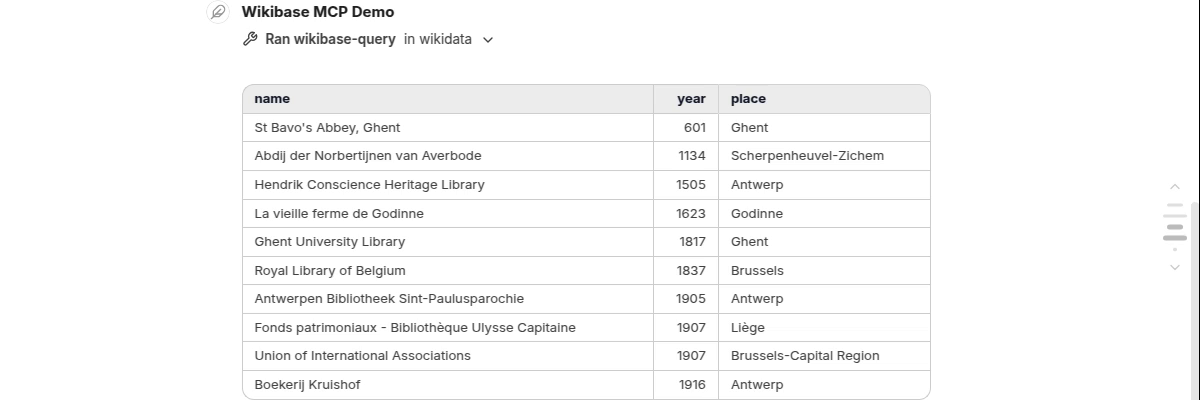
Use Wikidata and Wikibase with AI
Connect Claude, ChatGPT, or any other MCP client to Wikidata and your own Wikibase. Ask, create, and enrich in plain language.

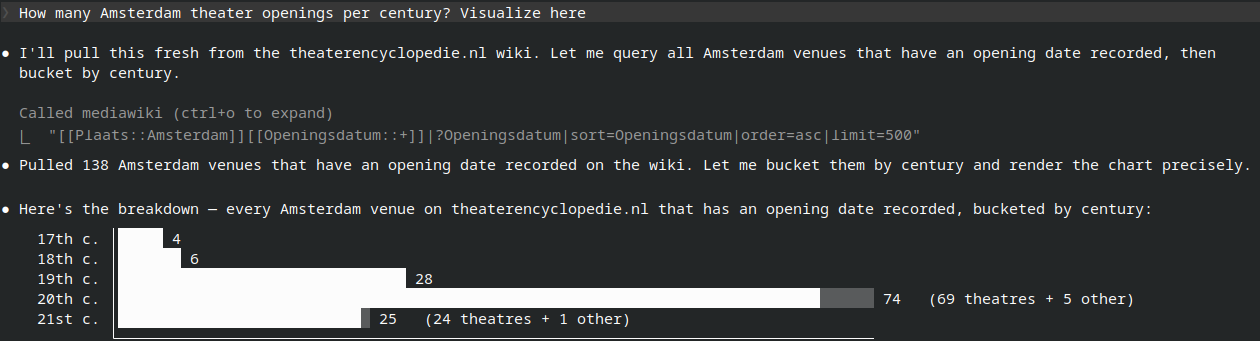
Use Semantic MediaWiki with AI
Our open-source MediaWiki MCP Server now speaks Semantic MediaWiki. Let AI assistants run #ask queries and build the properties and templates behind your data.

MediaWiki Chatbot Extensions Compared
You can now ask your wiki questions in natural language. We compare five MediaWiki chatbot extensions to help you choose the right one.