Member Access
Members-only wikis for MediaWiki: readers log in with an email one-time code, admitted by an allowlist of addresses and domains
On this page
External links
Member Access for MediaWiki
Member Access turns your MediaWiki into a members-only wiki. Readers log in with an email one-time code, admitted by an allowlist of addresses and domains that you organize into groups. Members can read and nothing else, and their accounts are created automatically at first login.
There are no passwords to hand out. Put an address or a whole domain on the allowlist, and everyone it covers can log in. Remove the entry and access ends at the next login. Deactivate a member and they are locked out at once.
Member Access is free and open source. It decides who can log in, not who can read: restricting reading to logged-in users is a one-line wiki setting you pair it with. It has no management pages of its own. Groups, entries and members are managed over a REST API, or from the Admin Panel on our hosting.
Professional Wiki created Member Access. We are MediaWiki developers that provide professional MediaWiki services.
Usage Documentation
Logging in with an email code
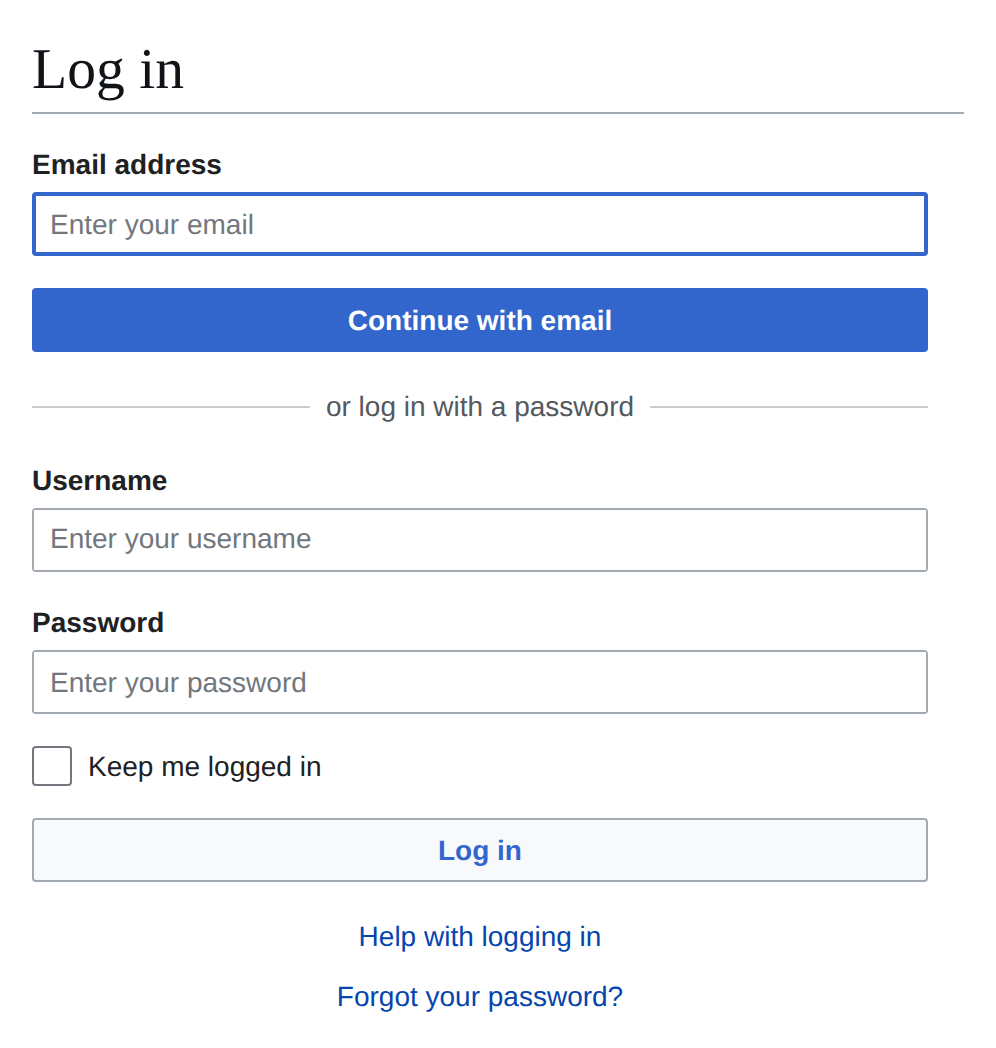
A visitor enters their email address in the box the login form leads with, and clicks "Continue with email". If the address is on the allowlist, a six-digit code arrives by mail, leading the subject line so it can be read off a notification. The code is valid for ten minutes and works once.
Entering the code logs the visitor in. The first login also creates their account, in
the reader user group. The account is named Member plus six
random characters, so the name says nothing about who holds it. The address is kept on
the account as its confirmed email. A login is remembered for thirty days.
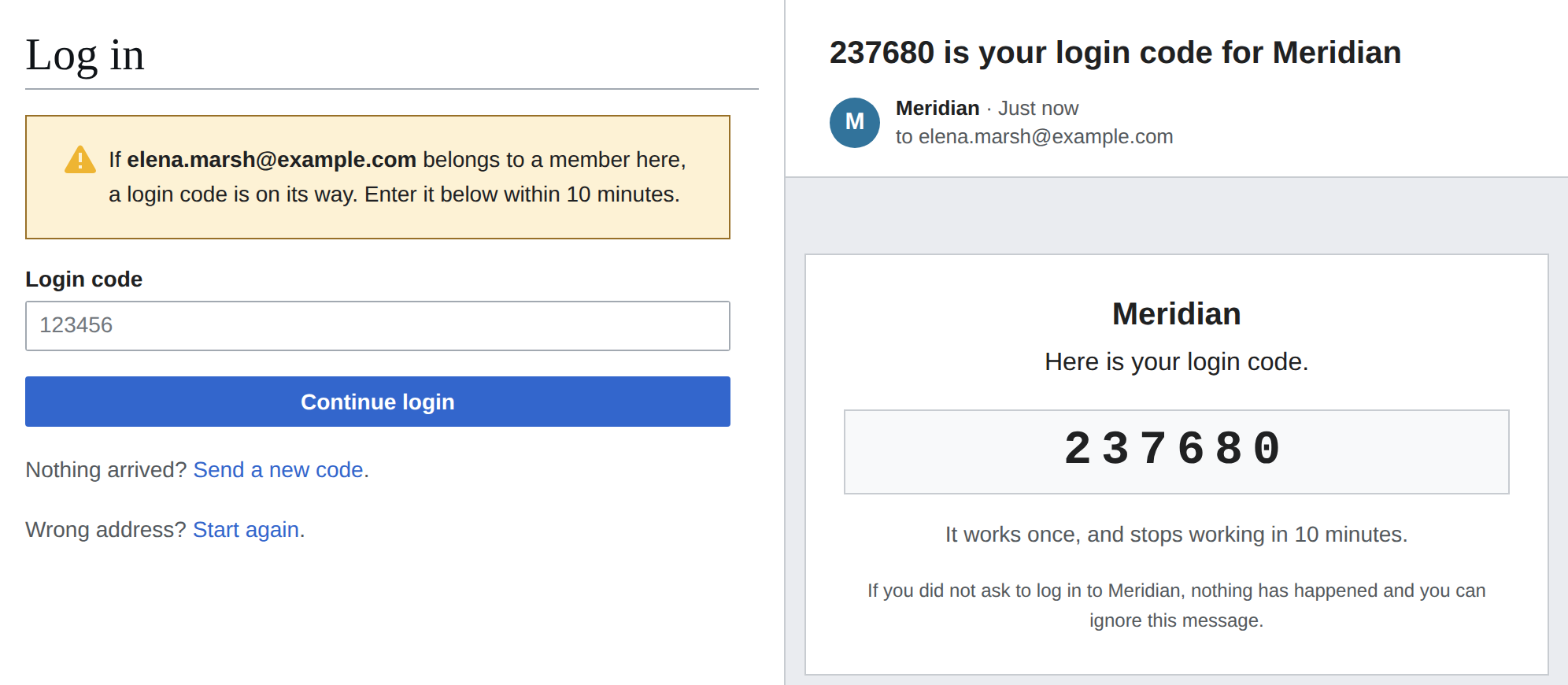
A member never has a password. Setting one is refused, and so is a password reset. A code never opens an account that was created some other way, so it cannot open a staff account. Codes are stored hashed, invalidated after five wrong entries, and rate limited per address and per IP. A visitor can ask for another code, which replaces the one before it and counts against the same limits.
Members can read and nothing else
A member cannot edit, move pages, upload files or send email through the wiki, and cannot see or change their own account details and preferences. Your staff accounts are ordinary MediaWiki accounts and keep working as before.
Groups and the allowlist
An allowlist entry is a single address or a whole domain, written as
@example.com, and belongs to exactly one group. Groups keep the roster
organized, for instance one group per client.
The allowlist is checked at every login, so removing an entry ends access the next time that member logs in. An open session is not cut short. To end access at once, deactivate the member.
Inviting a member
Adding an address to the allowlist sends no mail. To let the person know, send them an invitation. It names the login page and the address to log in with, and says that a code comes by mail instead of a password. It can be resent at any time. Only an address can be invited, not a domain.
Deactivating and removing a member
Deactivating a member blocks their account immediately, sitewide and indefinitely. The block is an ordinary MediaWiki block, so it shows in the block log and can be lifted by hand. Reactivating restores access.
Removing a member closes their account and frees their address for a new account. Their allowlist entry stays, so remove that too if they should not come back.
Single sign-on
Logins through your identity provider can be held to the same allowlist. A single sign-on login is then refused unless the address the provider returns matches an entry. A first login that matches creates a member account, like a code login does. Staff accounts that already exist are exempt.
This needs the OpenID Connect extension, version 8.3 or later, with the settings the README lists.
Keeping the member list private
Requesting a login code or a password reset gets the same answer for every address, on
the allowlist or not. Member accounts get random names like Member A7K2M4,
so no list or log shows who is behind an account. Only staff who manage members can see
the rename log, where an account's earlier name may appear.
The management API
Groups, allowlist entries and the roster are managed over a REST API under
/rest.php/member-access/v0/. Every endpoint requires the
memberaccess-manage right, which sysops and bureaucrats have by default,
and writes require the wiki's CSRF token. Deactivating and reactivating a member also
require the block right. To admit your first members, create a group and
add their addresses to it:
POST /rest.php/member-access/v0/groups
{ "name": "Clients" }

POST /rest.php/member-access/v0/groups/1/entries
{ "values": [ "jane@example.com", "@example.org" ] }| Endpoint | What it does |
|---|---|
GET /groups |
Every group with its entry count and member counts |
POST /groups |
Creates a group |
PUT /groups/{id} |
Renames a group |
DELETE /groups/{id} |
Deletes a group that no longer holds entries or members |
GET /groups/{id}/entries |
The group's allowlist entries |
POST /groups/{id}/entries |
Adds entries, up to 500 at once: email addresses or @domains |
DELETE /entries/{id} |
Removes an allowlist entry |
POST /entries/{id}/invitation |
Mails an invitation to the entry's address |
GET /members |
The roster: each member's address, group, creation date, last login and whether they are active, plus totals overall and per group |
POST /members/{userId}/deactivate |
Ends a member's access |
POST /members/{userId}/reactivate |
Restores a member's access |
DELETE /members/{userId} |
Removes a member |
The API reference lists request bodies and error codes.
Installation
Requirements
- PHP 8.3 or later
- MediaWiki 1.43 or later
- MySQL, MariaDB or SQLite (PostgreSQL is not supported)
- Working outgoing email, since login codes and invitations are sent by mail
Load and enable
Load the extension using Composer:
COMPOSER=composer.local.json composer require --no-update professional-wiki/member-access:~1.0Enable the extension by adding the following to your LocalSettings.php:
wfLoadExtension( 'MemberAccess' );
$wgMemberAccessCodeLogin = 'allowlisted';
The second line turns on the email code login for the addresses on the allowlist. Without it, nobody can log in as a member.
Update MediaWiki database
Run the MediaWiki update.php script:
php maintenance/run.php updateYou can verify the installation by checking your wiki's Special:Version page.
Run update.php again after every upgrade, since a new version can add a column to a table the wiki already has.
Making the wiki private
Member Access does not restrict reading. To let only logged-in users read, add the usual private-wiki setting to LocalSettings.php:
$wgGroupPermissions['*']['read'] = false;Members can then read, while anonymous visitors only get the login page. See Preventing access for other ways to restrict access.
Configuration
Login routes
Members can log in over two routes: the email code login and single sign-on.
$wgMemberAccessCodeLogin says who the code login admits:
| Value | Who can log in with a code |
|---|---|
'allowlisted' |
The addresses on the allowlist |
'open' |
Every address. For a wiki behind another gate, such as an internal network |
'off' |
Nobody. The code login is not offered. The default |
$wgMemberAccessApplyAllowlistToSso = true holds
single sign-on logins to the allowlist. By default they
are left alone. The
README
lists the OpenID Connect settings this depends on.
What loading the extension changes
Loading the extension also:
- makes a block disable logging in, so a deactivated member stays out of a private wiki;
- turns on account autocreation and sets remembered logins to thirty days, both wiki-wide, while a login route is on;
- turns off ConfirmEdit's per-account captcha trigger for failed logins, while the code login is on.
The README has the full list.
Settings
The configuration reference
lists every setting with its default, such as the reader group name, the code lifetime,
the rate limits and the sender address. Login codes and invitations are sent as
formatted mail when $wgAllowHTMLEmail is on, and as plain text otherwise.
Logging and storage
Every code request, login, failure and rate-limit hit is logged, with the email address hashed. Route the log channel to keep this audit trail:
$wgDebugLogGroups['MemberAccess'] = '/path/to/memberaccess.log';
Issued codes and rate-limit counters are held in MediaWiki's main object stash, which is
database-backed by default. Point $wgMainStash at Redis or Valkey to keep
them out of the database.
Member Access in the Admin Panel
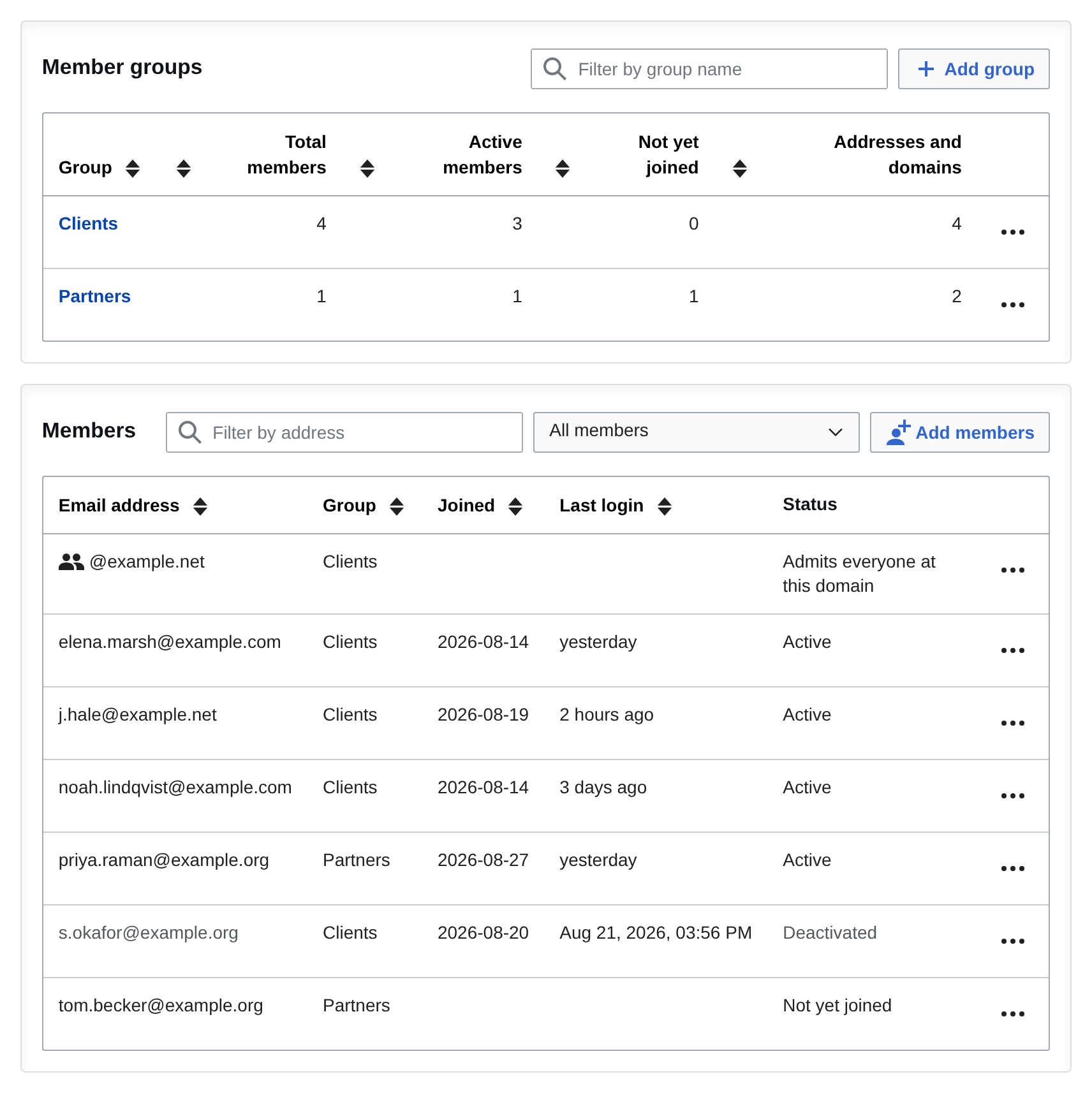
On our managed MediaWiki hosting, we enable Member Access on request. You then turn on the email code login and manage groups, members and invitations from the Admin Panel's Members tab.
More MediaWiki Extensions
Professional MediaWiki Services
MediaWiki services by the authors of Member Access

Get superior results from the best MediaWiki developers with a proven track record of creating MediaWiki extensions & integrations.

Make your wiki look great! Use a time-tested responsive MediaWiki theme, or have us create a custom MediaWiki skin for you.

Let us take care of your wiki. We are MediaWiki hosting experts and provide cloud hosting, dedicated hosting, and on-premise hosting.

Bring your wiki to the next level by leveraging our MediaWiki expertise. From strategic planning to wikitext, we have you covered.

Migrate your wiki with confidence. We move your MediaWiki to a new home, or we help you migrate from another system to MediaWiki.

Keep your MediaWiki up-to-date and secure. We offer MediaWiki maintenance services to keep your wiki running smoothly.