- Topic and outline
- Jeroen De Dauw and Claude
- Writing
- Claude
- Editing
- Jeroen De Dauw and Claude
Use Wikidata and Wikibase with AI
Connect Claude, ChatGPT, or any other AI tool that speaks MCP to Wikidata and to your own Wikibase. Ask questions in plain language, create items and enrich them, without writing SPARQL or entity JSON.
Our MediaWiki MCP Server speaks Wikibase. It works with Wikidata and with any Wikibase you run, and it is free and open source. MCP, the Model Context Protocol, is the standard that lets AI tools work with external systems and data.
Ask questions instead of writing SPARQL
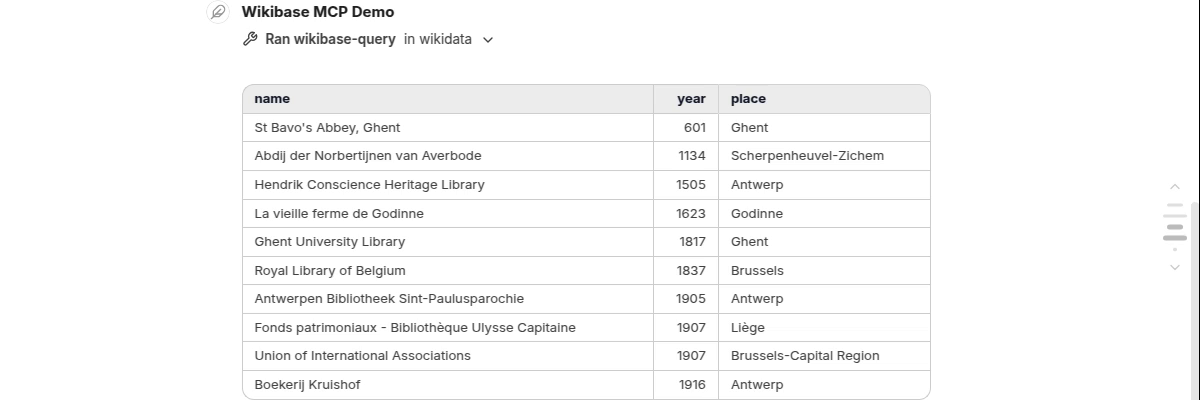
Ask in your own words. For a single entity, the assistant searches for it and reads it. When a question needs a query, the assistant works out which properties it maps to, writes the SPARQL, runs it, and shows you the result, as it does in the demo for the oldest libraries in Belgium. You refine in the same conversation. Reading Wikidata needs no account. Your own Wikibase answers the same way, and SPARQL questions require it to have a query service.
Create and enrich items from what the assistant finds
The same conversation can write. Point the assistant at data it has just read, or at any other source it
can reach, and describe in plain words what you want made of it. It finds the matching properties on your
wiki, with their datatypes, and fits the values to them. A prompt like
Create items in our wiki for these ten libraries: inception as an EDTF value, the Wikidata ID, and
		located in, creating the place items you need.
is all the mapping instruction it gets.
That is the import in the demo, into our Wikibase EDTF demo wiki. The founding dates become EDTF values at Wikidata's own precision, a day for the Royal Library of Belgium and a century for St Bavo's Abbey. The Wikidata IDs become external identifiers. Where a property takes an item rather than text, the assistant creates the missing target items and links to them, which is how the libraries got their places. A second prompt then adds each library's official website: one sentence backfills a statement across the whole batch. Royal Library of Belgium (Q191) is the public result.
Keep control of what gets written
An assistant can match the wrong property or duplicate an item that already exists, so the writes have to stay reviewable, and they do. Every write is an ordinary wiki edit: it lands in Recent Changes and the item's history with an edit summary naming the tool behind it, the account's contributions list gathers a batch in one place, and each edit can be undone like any other. Review a batch before you trust the next one.
The server reaches your wiki as an account you configure, so the edits appear under that account and the assistant has exactly its rights. Without the edit right it cannot change anything. Ten items is a job for an assistant; thousands are a job for a script, which is faster and spends no model usage. What the assistant reads goes to your model provider, so treat a private wiki accordingly. Wikidata is a Wikibase too, so the writing tools work there with an account, but its bot policy governs batch edits, which is why the demo writes into a wiki of our own.
The Wikibase tools
wikibase-search-entitiesfinds items and properties by label or alias.-
wikibase-get-entityreads one entity's terms and statements, with the IDs it references resolved to labels. wikibase-queryruns a SPARQL query against the wiki's query service.wikibase-edit-entitycreates an entity or changes an existing one.wikibase-add-statementadds a single statement to an item.
The server reads the wiki's siteinfo, so these tools appear only on a Wikibase, and
wikibase-query only where the wiki publishes a query service.
Getting started
The server runs beside your wiki and talks to its API; nothing is installed on the wiki itself. You run it yourself, or take it as an add-on to our managed hosting. Your AI tool and its model subscription are your own. The MediaWiki MCP Server page explains how to connect the two, and the extension packs documentation lists the tools for Wikibase and other extensions.
Wikibase and AI services
We provide Wikibase services, including hosting, development, and consulting, and help bring AI to your wiki. Get in touch if you want help connecting yours.
See also
- Use Semantic MediaWiki with AI, the same server against a Semantic MediaWiki wiki.
- Top Wikibase Extensions, our curated list of extensions that enhance a Wikibase, including Wikibase EDTF.
- Introducing NeoWiki and More at MUDCon, which includes a recorded demo of the MediaWiki MCP Server.